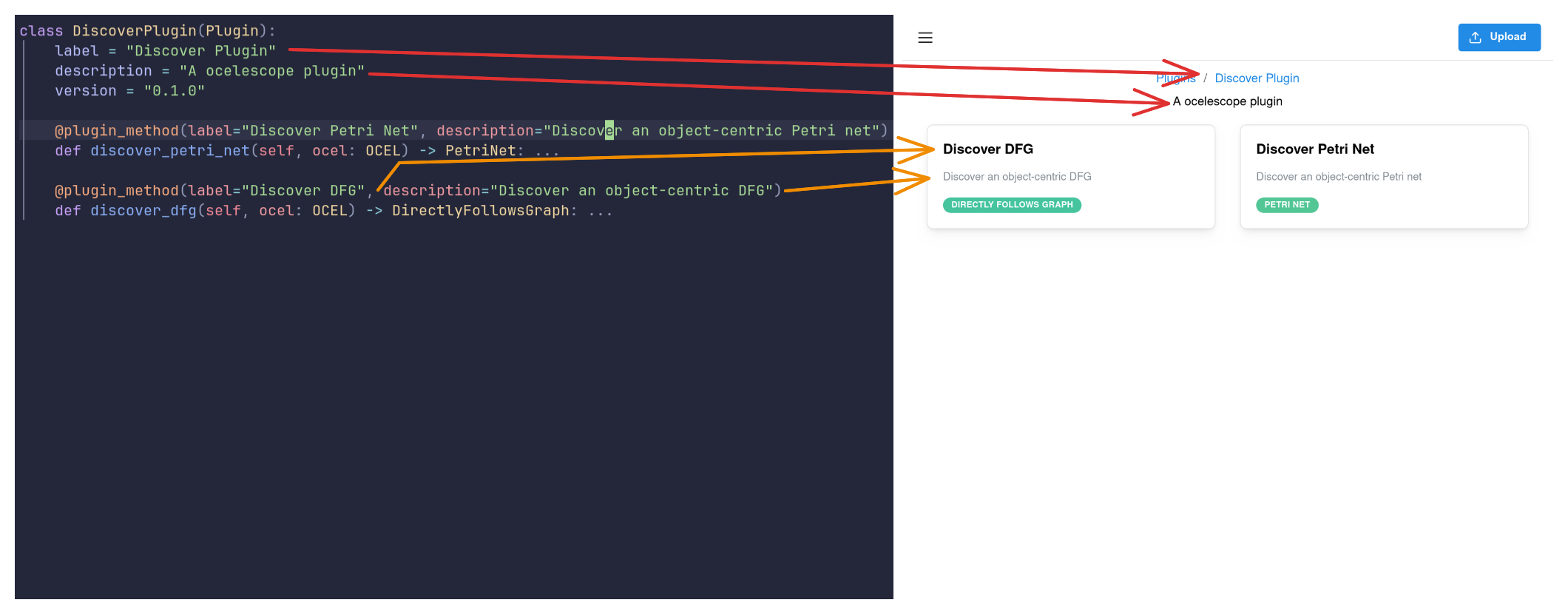
fromocelescopeimportOCEL,PetriNet,Plugin,plugin_methodclassDiscoveryPlugin(Plugin):label="Discovery Plugin"description="An Ocelescope plugin"version="1.0.0"@plugin_method(label="Discover Petri Net",description="Discover an object-centric Petri net",)defdiscover_ocpn(self,ocel:OCEL)->PetriNet:...
fromocelescopeimportOCEL,PetriNet,Plugin,plugin_methodfrom.custom_resourcesimportConformanceResult,VariantclassDiscoveryPlugin(Plugin):...@plugin_method(label="Discover Petri Net",description="Discover an object-centric Petri net",)defdiscover_ocpn(self,ocel:OCEL)->PetriNet:...@plugin_method(label="Discover Variants",description="Discover variants",)defdiscover_olpm(self,ocel:OCEL)->list[Variant]:...@plugin_method(label="Alignment-based Conformance",description="Compute alignment-based conformance",)defconformance_alignment(self,petri_net:PetriNet,variants:list[Variant],)->ConformanceResult:...
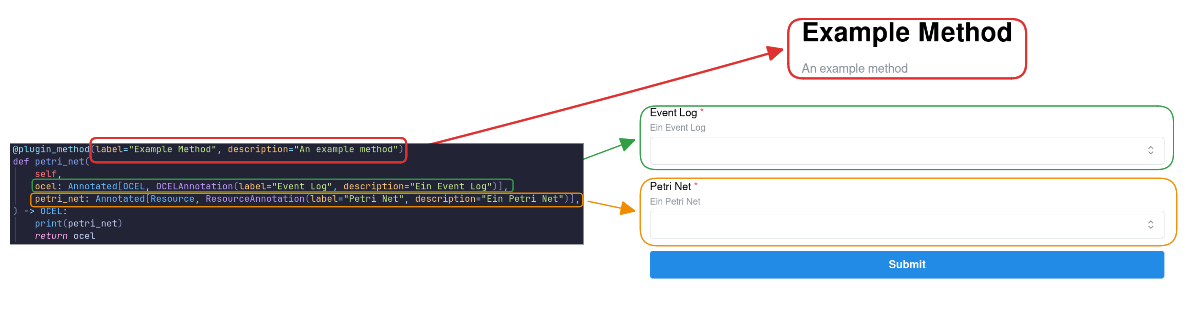
The function definitions (decorator metadata, parameter types, and return types) are used to automatically generate an input form in the frontend.
Metadata
In addition to the @plugin_method metadata, you can annotate input parameters with ResourceAnnotation and OCELAnnotation from the Ocelescope package to provide extra context—such as a human-readable title or description—for the function and its inputs.
In addition to Resource and OCEL parameters, a plugin method can define one extra configuration parameter of type PluginInput.
Use a PluginInput when your method needs user-provided settings—for example:
a noise threshold between 0 and 1
selecting a leading object type for computing process executions
toggles, lists, or other algorithm parameters
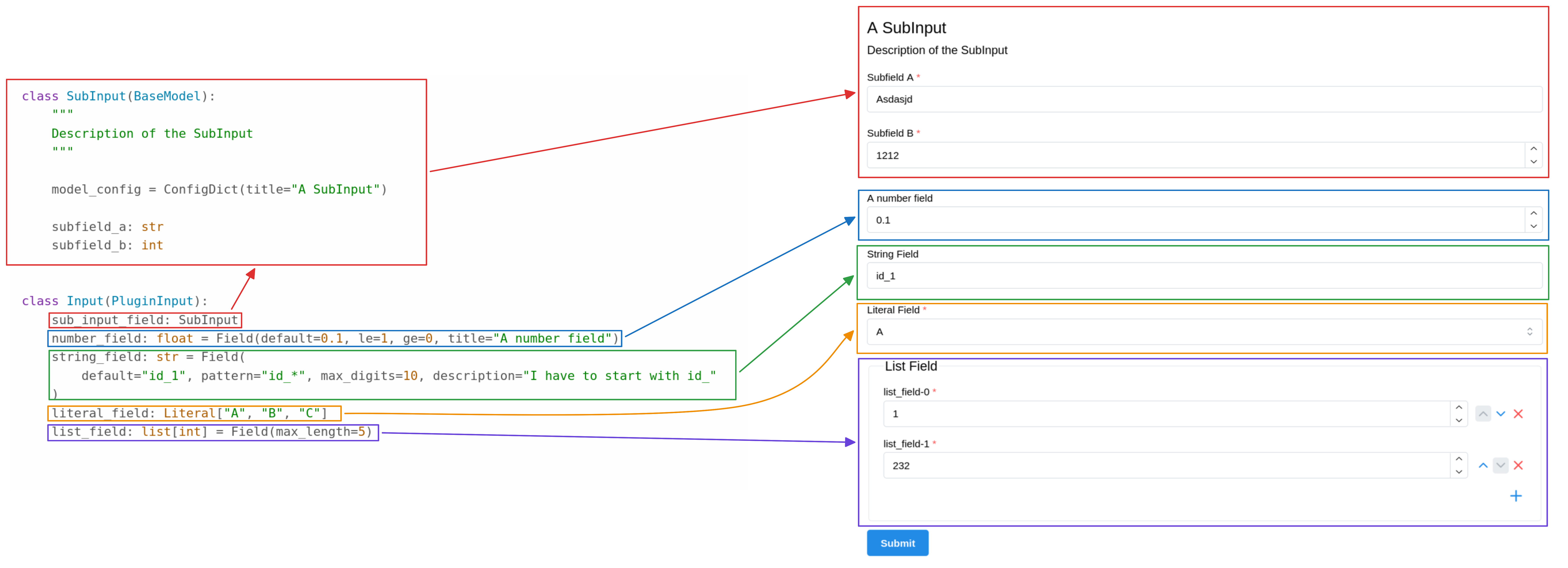
Configuration settings are grouped into a single class that inherits from PluginInput (from the Ocelescope Python package). Each setting is defined as a class field and can be a str, bool, number, list, or even another Pydantic model.
To make inputs easier to use in the UI, you can add:
metadata (title, description, etc.), and
constraints (min/max values, patterns, list length, …)
fromtypingimportAnnotated,LiteralfromocelescopeimportOCEL,OCELAnnotation,Plugin,PluginInput,plugin_methodfrompydanticimportBaseModel,ConfigDict,FieldclassSubInput(BaseModel):"""Description of the SubInput."""model_config=ConfigDict(title="A SubInput")subfield_a:strsubfield_b:intclassInput(PluginInput):sub_input_field:SubInputnumber_field:float=Field(default=0.1,ge=0,le=1,title="A number field",)string_field:str=Field(default="id_1",pattern="id_*",max_digits=10,description="A string that has to start with id_",)literal_field:Literal["A","B","C"]list_field:list[int]=Field(max_length=5)classMinimalPlugin(Plugin):label="Minimal Plugin"description="An Ocelescope plugin"version="0.1.0"@plugin_method(label="Example Method",description="An example plugin method")defexample(self,ocel:Annotated[OCEL,OCELAnnotation(label="Event Log")],input:Input,# must be named `input`)->OCEL:...
OCEL fields let you populate configuration inputs with values taken directly from the selected OCEL log—for example:
available object types
available event types / activities
event IDs and object IDs
available event/object attribute names
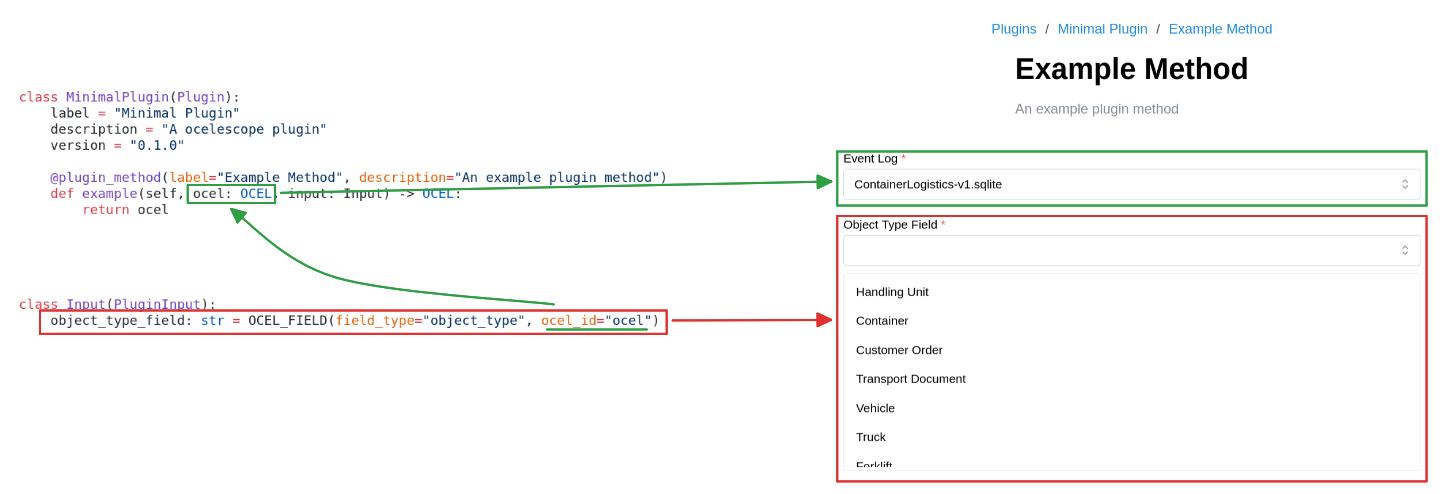
You define these fields with OCEL_FIELD. It works similarly to Pydantic’s Field, but instead of only validating user input, it connects the input to the OCEL so the UI can offer dropdowns/autocomplete based on the log.
Important: The ocel_id must match the name of the OCEL parameter in your plugin method (usually ocel). Otherwise, the field cannot be linked to the selected log.
fromtypingimportAnnotatedfromocelescopeimportOCEL,OCEL_FIELD,OCELAnnotation,Plugin,PluginInput,plugin_methodclassInput(PluginInput):object_type_field:str=OCEL_FIELD(field_type="object_type",ocel_id="ocel")object_type_list_field:list[str]=OCEL_FIELD(field_type="object_type",ocel_id="ocel")event_type_field:str=OCEL_FIELD(field_type="event_type",ocel_id="ocel")event_id_field:str=OCEL_FIELD(field_type="event_id",ocel_id="ocel")object_id_field:str=OCEL_FIELD(field_type="object_id",ocel_id="ocel")object_attribute_field:str=OCEL_FIELD(field_type="object_attribute",ocel_id="ocel")event_attribute_field:str=OCEL_FIELD(field_type="event_attribute",ocel_id="ocel")classMinimalPlugin(Plugin):label="Minimal Plugin"description="An Ocelescope plugin"version="0.1.0"@plugin_method(label="Example Method",description="An example plugin method")defexample(self,ocel:Annotated[OCEL,OCELAnnotation(label="Event Log")],input:Input,# must be named `input`)->OCEL:...
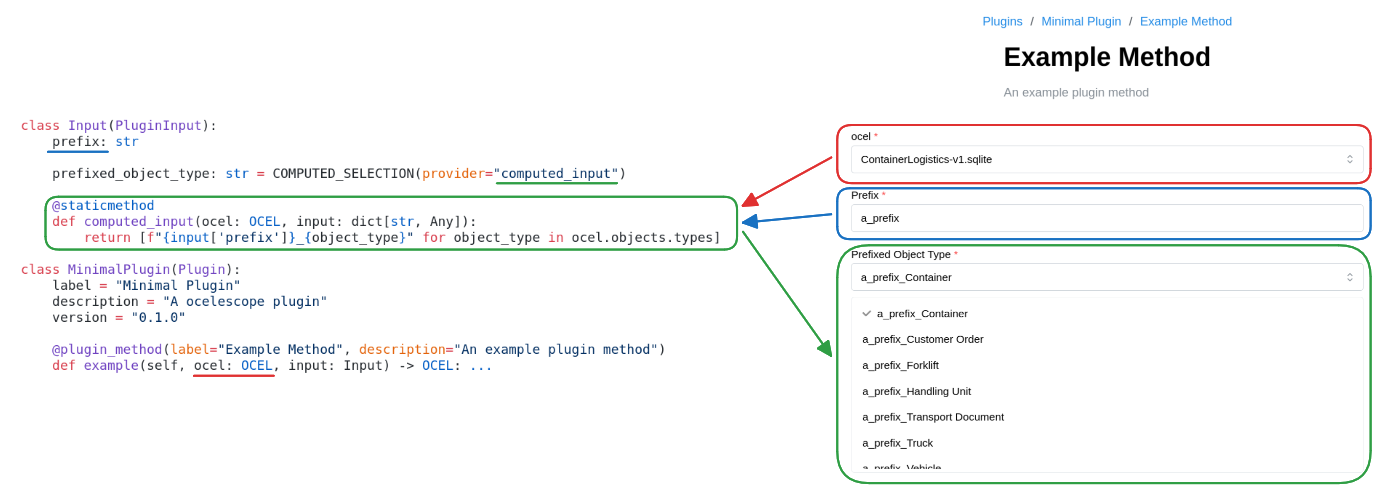
Computed inputs are fields whose available values are generated dynamically from the current state of the input form.
They are useful when the options depend on what the user has already entered—for example, generating a list of values based on a prefix, or filtering choices based on earlier selections.
Computed inputs are defined with COMPUTED_SELECTION. You provide the name of a provider function (as a string). Ocelescope calls that function whenever the user changes the form, and uses the returned list as the selectable values.