Skip to content

Resources

Resources are the main mechanism to define inputs and outputs of Ocelescope plugin methods.

When you define a resource, it becomes exportable and importable by default through an automatic exchange format.

Resources can also provide a visualization so they can be displayed in the frontend.
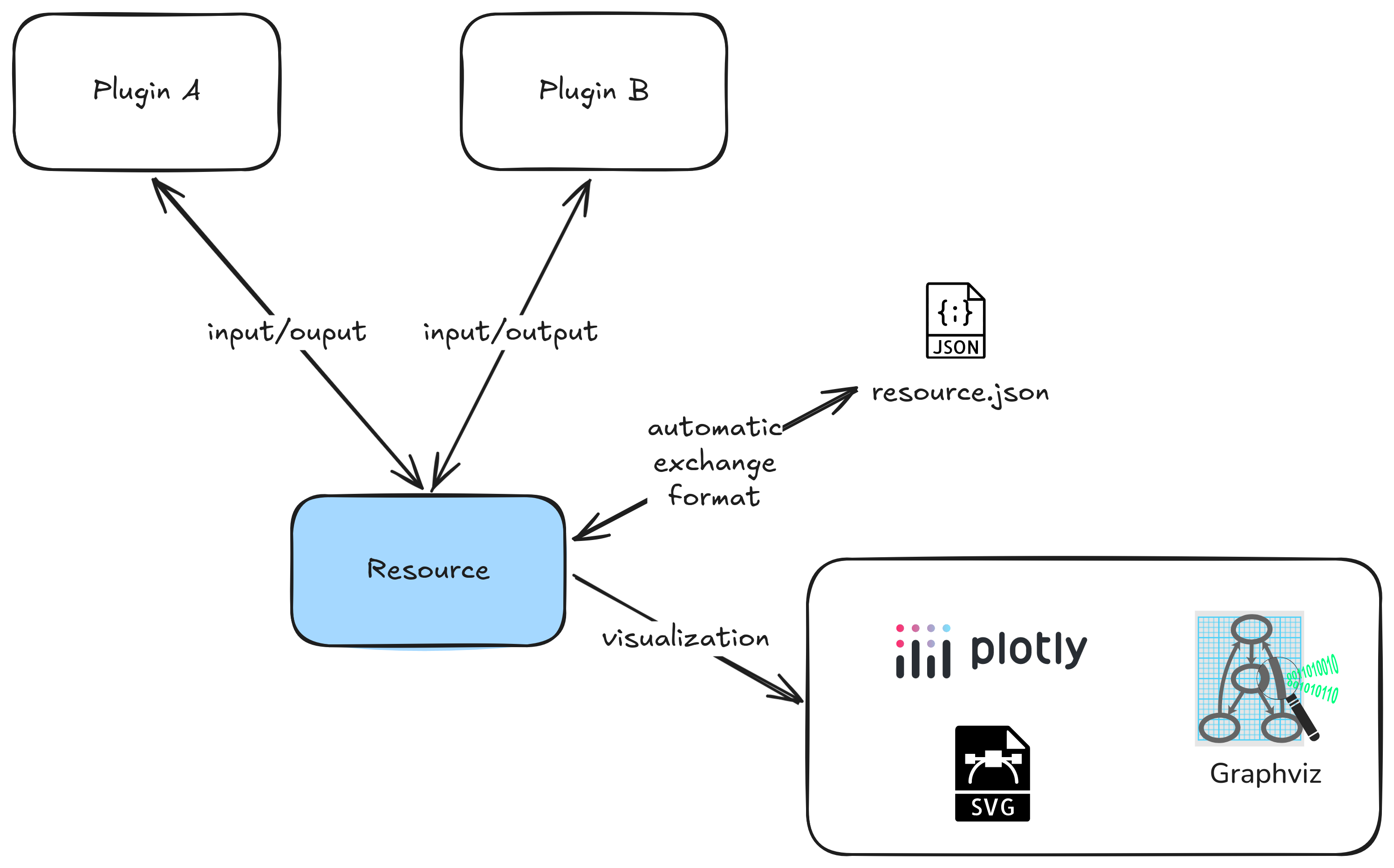
Resource Overview

Defining a resource

Define a resource by creating a Python class that inherits from Resource (from the ocelescope package). The structure of the resource is described through typed fields on the class. You can also set label and description to control how the resource appears in the frontend.

If you want to reuse a resource across plugins, keep the class name and the field definitions identical.

Example: defining a resource
1
2
3
4
5
6
7
8
from ocelescope import Resource

class Example(Resource):
    label = "Example Resource"
    description = "An example resource definition"

    property_a: str
    property_b: list[int]

Resources must be JSON-serializable

For import and export to work, a resource must be serializable and instantiable from its serialized form.

Use standard types like str, int, float, bool, list, or dict, or custom types that are themselves serializable.

If you use nested classes (for example, a resource that contains nodes and edges), make those nested classes Pydantic models (inherit from pydantic.BaseModel) so they can be validated and serialized consistently.

from pydantic import BaseModel
from ocelescope import Resource

class Node(BaseModel):
    id: str
    label: str

class Edge(BaseModel):
    source: str
    target: str
    label: str | None = None

class GraphResource(Resource):
    nodes: list[Node]
    edges: list[Edge]

# Quick round-trip check (serialize -> create again)
GraphResource(
    GraphResource(
        nodes=[Node(id="n1", label="Start"), Node(id="n2", label="End")],
        edges=[Edge(source="n1", target="n2", label="go")]
    ).model_dump()
)

Using resources in plugin methods

Ocelescope inspects the type hints of plugin methods. Resource types used as parameters are treated as resource inputs, and resource types used as the return type are treated as resource outputs and saved in the session for later use.

Resources as input and output
from ocelescope import Plugin, Resource, plugin_method

class MyResource(Resource):
    label = "My Resource"
    description = "Example resource"
    value: int

class ExamplePlugin(Plugin):
    label = "Example Plugin"
    description = "Shows how resources are registered via type hints"
    version = "1.0"

    @plugin_method(label="Increment resource")
    def increment(self, x: MyResource) -> MyResource:
        return MyResource(value=x.value + 1)

Visualizing resources

Resources can provide a visualization so they can be displayed in the frontend. To do this, implement a visualize() method on your resource that returns one of the visualization classes provided by Ocelescope.

A simple example is to return a Plotly figure from your resource

from ocelescope import Resource
from ocelescope.visualization.default.plotly import Plotly

import plotly.graph_objects as go


class Curve(Resource):
    x: list[float]
    y: list[float]

    def visualize(self) -> Plotly:
        fig = go.Figure(data=go.Scatter(x=self.x, y=self.y, mode="lines"))
        fig.update_layout(title="Curve")
        return Plotly(figure=fig)

Overview

Class Use case
Graph Interactive node/edge graph visualizations.
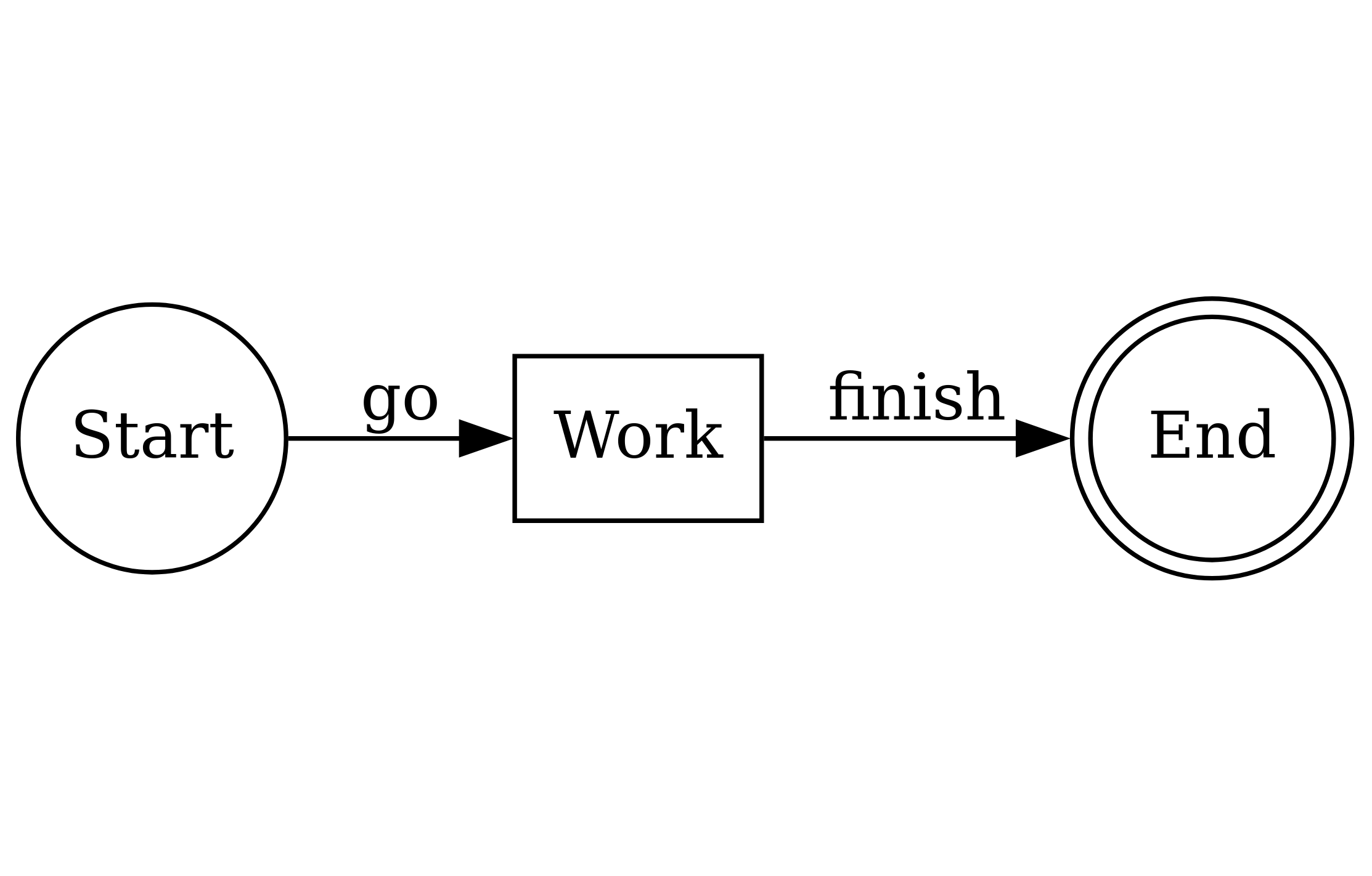
DotVis Rendering raw Graphviz DOT when you already have a DOT string.
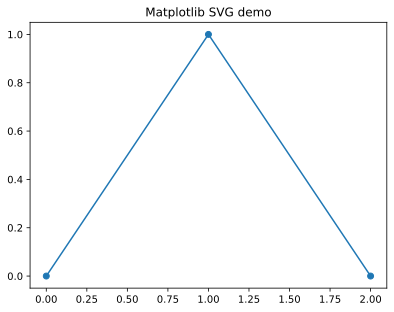
SVGVis Render SVG markup. Useful when you generate SVG with another library (for example Matplotlib).
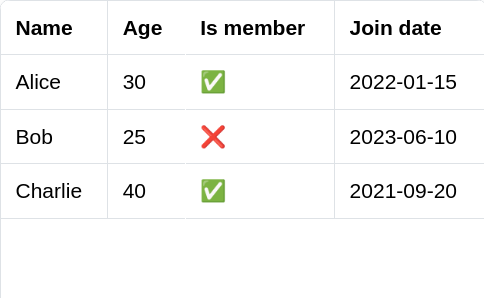
Table Displaying structured data as a typed table (rows + columns).
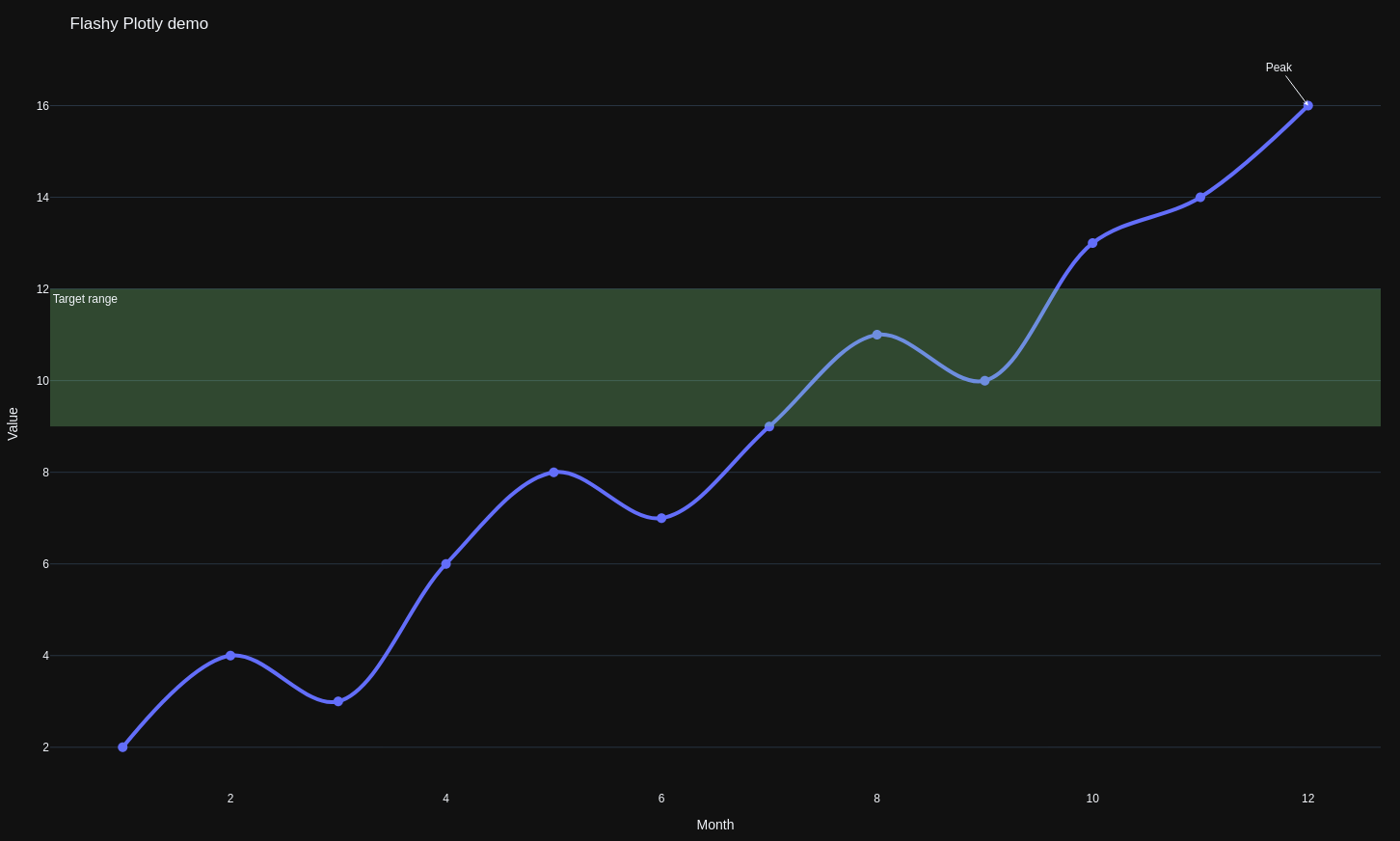
Plotly Interactive charts built with Plotly.

Examples

Basic graph Example (Graph)

Code
from ocelescope import Resource
from ocelescope.visualization.default.graph import (
    Graph,
    GraphEdge,
    GraphNode,
    GraphvizLayoutConfig,
)

class GraphExample(Resource):
    label = "Graph example (complex)"
    description = "A connected graph that shows all node shapes with colorful edges."

    def visualize(self) -> Graph:
        nodes = [
            GraphNode(
                id="n_circle",
                label="circle",
                shape="circle",
                color="#A7F3D0",
                border_color="#065F46",
                label_pos="bottom",
                width=20,
                height=20,
                rank="source",
            ),
            GraphNode(
                id="n_triangle",
                label="triangle",
                shape="triangle",
                color="#BFDBFE",
                border_color="#1D4ED8",
                label_pos="bottom",
                width=20,
                height=20,
            ),
            GraphNode(
                id="n_rectangle",
                label="rectangle",
                shape="rectangle",
                color="#FDE68A",
                border_color="#92400E",
                label_pos="center",
                width=40,
                height=50,
            ),
            GraphNode(
                id="n_diamond",
                label="diamond",
                shape="diamond",
                color="#FBCFE8",
                border_color="#9D174D",
                label_pos="bottom",
                width=40,
                height=40,
            ),
            GraphNode(
                id="n_hexagon",
                label="hexagon",
                shape="hexagon",
                color="#DDD6FE",
                border_color="#5B21B6",
                label_pos="top",
                width=30,
                height=30,
                rank="sink",
            ),
        ]

        edges = [
            GraphEdge(
                source="n_circle",
                target="n_triangle",
                label="circle → triangle",
                color="#EF4444",
                start_arrow=None,
                end_arrow="triangle",
            ),
            GraphEdge(
                source="n_triangle",
                target="n_rectangle",
                label="triangle → rectangle",
                color="#F59E0B",
                start_arrow="circle",
                end_arrow="chevron",
            ),
            GraphEdge(
                source="n_rectangle",
                target="n_diamond",
                label="rectangle → diamond",
                color="#10B981",
                start_arrow="tee",
                end_arrow="vee",
            ),
            GraphEdge(
                source="n_diamond",
                target="n_hexagon",
                label="diamond → hexagon",
                color="#3B82F6",
                start_arrow="square",
                end_arrow="diamond",
            ),
            GraphEdge(
                source="n_hexagon",
                target="n_circle",
                label="hexagon → circle",
                color="#8B5CF6",
                start_arrow="triangle-cross",
                end_arrow="circle-triangle",
            ),
        ]

        return Graph(
            nodes=nodes,
            edges=edges,
            layout_config=GraphvizLayoutConfig(
                engine="dot",
                graphAttrs={"rankdir": "LR", "nodesep": 1, "ranksep": 1},
            ),
        )
Basic graph example

SVG through markup (SVGVis)

Code
from ocelescope import Resource
from ocelescope.visualization.default.svg import SVGVis

class MyRawSVGResource(Resource):
    label = "SVG example (raw markup)"
    description = "Render raw SVG markup."

    def visualize(self) -> SVGVis:
        svg = """
        <svg xmlns="http://www.w3.org/2000/svg" width="420" height="140">
          <rect x="10" y="10" width="400" height="120" rx="10" fill="#f3f4f6"/>
          <text x="25" y="40" font-size="18" fill="#111827">SVGVis demo</text>

          <circle cx="70" cy="85" r="22" fill="#f59e0b"/>
          <rect x="120" y="65" width="80" height="40" rx="6" fill="#60a5fa"/>
          <polygon points="250,105 230,65 270,65" fill="#34d399"/>

          <text x="310" y="92" font-size="14" fill="#374151">Raw SVG markup</text>
        </svg>
        """
        return SVGVis(svg=svg)
SVG example (raw markup)

SVG through matplotlib (SVGVis)

Code
import io

from ocelescope import Resource
from ocelescope.visualization.default.svg import SVGVis

class MyMatplotlibSVGResource(Resource):
    label = "SVG example (Matplotlib)"
    description = "Generate SVG with Matplotlib and render it."

    def visualize(self) -> SVGVis:
        # Keep the import inside the method so the plugin still loads
        # even if Matplotlib is not installed.
        try:
            import matplotlib.pyplot as plt
        except ImportError:
            return SVGVis(
                svg="""
                <svg xmlns="http://www.w3.org/2000/svg" width="520" height="80">
                  <rect x="10" y="10" width="500" height="60" rx="10" fill="#FEF3C7"/>
                  <text x="25" y="48" font-size="14" fill="#92400E">
                    Matplotlib is not installed in this environment.
                  </text>
                </svg>
                """
            )

        fig, ax = plt.subplots()
        ax.plot([0, 1, 2], [0, 1, 0], marker="o")
        ax.set_title("Matplotlib SVG demo")

        buffer = io.StringIO()
        fig.savefig(buffer, format="svg", bbox_inches="tight")
        plt.close(fig)

        return SVGVis(svg=buffer.getvalue())
SVG example (generated by Matplotlib)

Table (Table)

Code
from ocelescope import Resource
from ocelescope.visualization.default.table import Table, TableColumn

class MyTableResource(Resource):
    label = "Table example"
    description = "Display structured data as a typed table."

    def visualize(self) -> Table:
        return Table(
            columns=[
                TableColumn(id="name", label="Name", data_type="string"),
                TableColumn(id="age", label="Age", data_type="number"),
                TableColumn(id="member", label="Is member", data_type="boolean"),
                TableColumn(id="joined", label="Join date", data_type="date"),
            ],
            rows=[
                {"name": "Alice", "age": 30, "member": True, "joined": "2022-01-15"},
                {"name": "Bob", "age": 25, "member": False, "joined": "2023-06-10"},
                {"name": "Charlie", "age": 40, "member": True, "joined": "2021-09-20"},
            ],
        )
Table example

Dot (DotVis)

Code
from graphviz import Digraph

from ocelescope import Resource
from ocelescope.visualization.default.dot import DotVis

class MyDotResource(Resource):
    label = "DotVis example"
    description = "Render a Graphviz DOT diagram."

    def visualize(self) -> DotVis:
        dot = Digraph()
        dot.attr(rankdir="LR")

        dot.node("A", "Start", shape="circle")
        dot.node("B", "Work", shape="box")
        dot.node("C", "End", shape="doublecircle")

        dot.edge("A", "B", label="go")
        dot.edge("B", "C", label="finish")

        return DotVis.from_graphviz(
            graph=dot,
            layout_engine="dot",
        )
DotVis example

Plotly (Plotly)

Code
import plotly.graph_objects as go

from ocelescope import Resource
from ocelescope.visualization.default.plotly import Plotly

class PlotlyExample(Resource):
    label = "Plotly example"
    description = "Interactive charts built with Plotly."

    def visualize(self) -> Plotly:
        x = list(range(1, 13))
        y = [2, 4, 3, 6, 8, 7, 9, 11, 10, 13, 14, 16]

        fig = go.Figure()

        fig.add_trace(
            go.Scatter(
                x=x,
                y=y,
                mode="lines+markers",
                name="Signal",
                line=dict(width=4, shape="spline"),
                marker=dict(size=10),
                hovertemplate="Month %{x}<br>Value %{y}<extra></extra>",
            )
        )

        fig.add_hrect(
            y0=9,
            y1=12,
            line_width=0,
            fillcolor="lightgreen",
            opacity=0.25,
            annotation_text="Target range",
            annotation_position="top left",
        )

        fig.add_annotation(
            x=x[-1],
            y=y[-1],
            text="Peak",
            showarrow=True,
            arrowhead=3,
            ax=-30,
            ay=-40,
        )

        fig.update_layout(
            title="Flashy Plotly demo",
            template="plotly_dark",
            height=420,
            margin=dict(l=40, r=20, t=60, b=40),
            legend=dict(
                orientation="h",
                yanchor="bottom",
                y=1.02,
                xanchor="right",
                x=1,
            ),
        )

        fig.update_xaxes(title="Month", showgrid=False)
        fig.update_yaxes(title="Value", zeroline=False)

        return Plotly(figure=fig)
Plotly example

Graph with annotations (Graph)

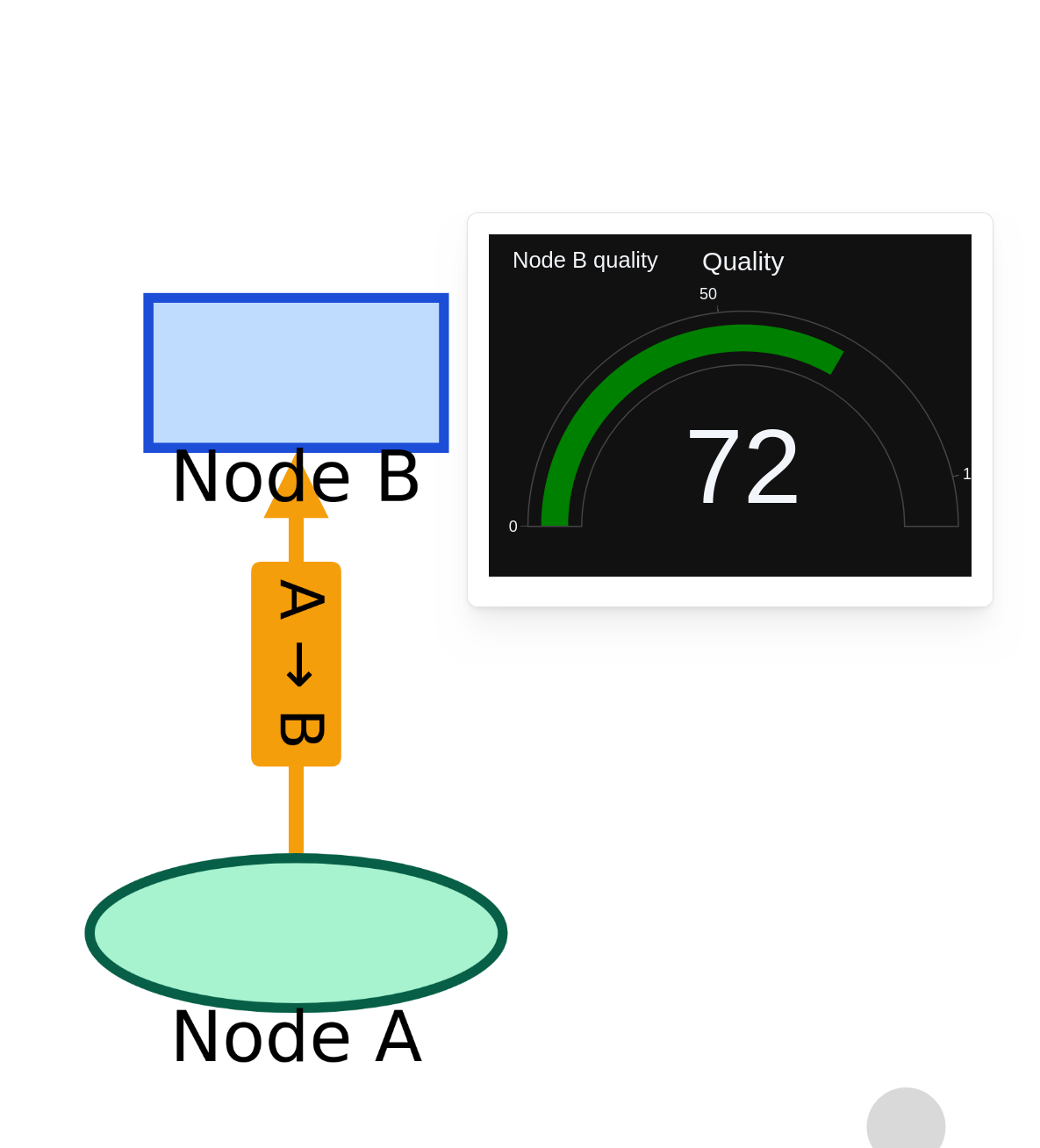
You can annotate Graph nodes and edges with other visualizations, which the frontend can open when the user clicks the node or edge.

Code
import plotly.graph_objects as go

from ocelescope import Resource
from ocelescope.visualization.default.graph import Graph, GraphEdge, GraphNode, GraphvizLayoutConfig
from ocelescope.visualization.default.plotly import Plotly


class InteractiveGraphExample(Resource):
    label = "Graph example (interactive annotations)"
    description = "A graph where nodes/edges have Plotly annotations."

    def visualize(self) -> Graph:
        # Node A annotation
        fig_a = go.Figure(
            data=[go.Bar(x=["Queued", "Running", "Done"], y=[3, 1, 8])],
        )
        fig_a.update_layout(
            title="Node A stats",
            template="plotly_dark",
            height=260,
            margin=dict(l=30, r=10, t=50, b=30),
        )

        # Node B annotation
        fig_b = go.Figure(
            data=[go.Indicator(mode="gauge+number", value=72, title={"text": "Quality"})],
        )
        fig_b.update_layout(
            title="Node B quality",
            template="plotly_dark",
            height=260,
            margin=dict(l=30, r=10, t=50, b=30),
        )

        # Edge annotation
        fig_edge = go.Figure(
            data=[go.Scatter(x=[1, 2, 3, 4, 5], y=[2, 3, 2, 4, 6], mode="lines+markers")],
        )
        fig_edge.update_layout(
            title="Edge throughput",
            template="plotly_dark",
            height=260,
            margin=dict(l=30, r=10, t=50, b=30),
        )

        return Graph(
            nodes=[
                GraphNode(
                    id="A",
                    label="Node A",
                    shape="circle",
                    color="#A7F3D0",
                    border_color="#065F46",
                    label_pos="bottom",
                    annotation=Plotly(figure=fig_a),
                ),
                GraphNode(
                    id="B",
                    label="Node B",
                    shape="rectangle",
                    color="#BFDBFE",
                    border_color="#1D4ED8",
                    label_pos="bottom",
                    annotation=Plotly(figure=fig_b),
                ),
            ],
            edges=[
                GraphEdge(
                    source="A",
                    target="B",
                    label="A → B",
                    color="#F59E0B",
                    end_arrow="triangle",
                    annotation=Plotly(figure=fig_edge),
                )
            ],
            layout_config=GraphvizLayoutConfig(engine="dot"),
        )
Graph with annotations example