Create a Plugin
The quickest way to start is from the plugin template:
git clone https://github.com/promi4s/plugin-template.gitcd plugin-templateInstall the dependencies (we recommend uv):
uv syncMost of your work happens in plugin.py. See Plugin Structure
for the expected package layout.
The Plugin Class
Section titled “The Plugin Class”Plugins are defined by a single plugin class that inherits from the Plugin base class provided by the Ocelescope Python package.
A plugin class contains:
- Metadata (e.g., label, description, version) that is displayed in the frontend’s plugin interface.
- Runnable functions (plugin methods) that can be invoked from within Ocelescope.
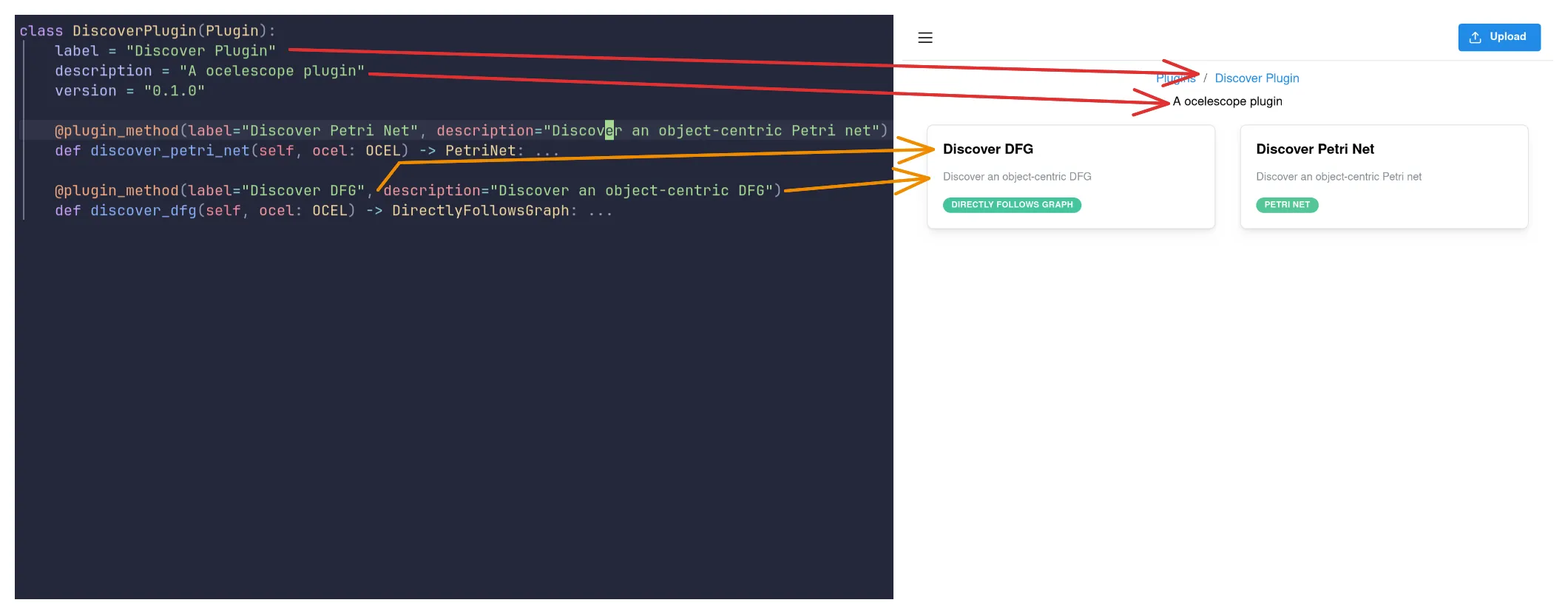
Each plugin package must export exactly one plugin class via its __init__.py.
- The class name (
DiscoveryPlugin) is the unique name of your plugin and helps distinguish it from other plugins. - The
labelis what will be shown in the UI. - The
descriptionbriefly explains what your plugin does. - The
versionlets you update your plugin over time.
Once you have a plugin class, the next step is to add Functions that can be run from Ocelescope.