Plugin Structure
Plugins are packaged as Python modules and distributed as .zip archives.
The __init__.py file serves as the plugin’s entry point.
Available Templates
Section titled “Available Templates”There are two ways to start a new plugin. For a full walkthrough of what to do once the project is set up, see the plugin tutorial.
Copier Template (Recommended)
Section titled “Copier Template (Recommended)”The copier template asks a few questions (such as the plugin name) and generates a ready-to-use project with everything already renamed.
If you have uv installed, you can run copier without installing it:
uvx copier copy gh:promi4s/create-ocelescope-plugin my-pluginIf you have copier installed:
copier copy gh:promi4s/create-ocelescope-plugin my-pluginReplace my-plugin with the folder the project should be created in.
GitHub Template
Section titled “GitHub Template”If you prefer not to use copier, start from the plugin template repository. Here you rename the plugin yourself afterwards.
Either clone it directly:
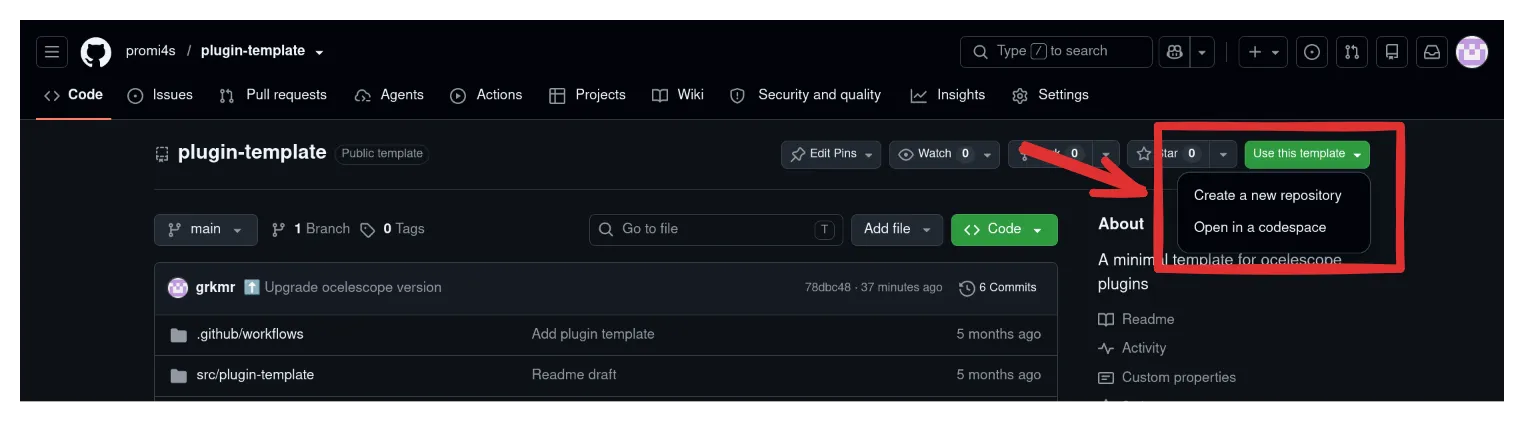
git clone https://github.com/promi4s/plugin-template.git my-plugincd my-pluginOr create your own repository from it on GitHub via Use this template → Create a new repository: